Settings live on two pages. Workspace Settings holds what every suite shares: name, logo and state. Civil Suite Settings holds the Civil-only choices: induction, toolbox talks, RCTI details, subcontractor insurance and performance reviews.
Who can use it — Anyone holding the "update tenant settings" permission, typically admins and senior managers. If you can't see these pages, you don't have it. See Roles & Permissions.
Where to find it — Account → Workspace Settings, and Administration → Civil Suite Settings. Workspace Settings links to each suite's own settings.
Workspace Settings
Make your changes, then press Save Changes.
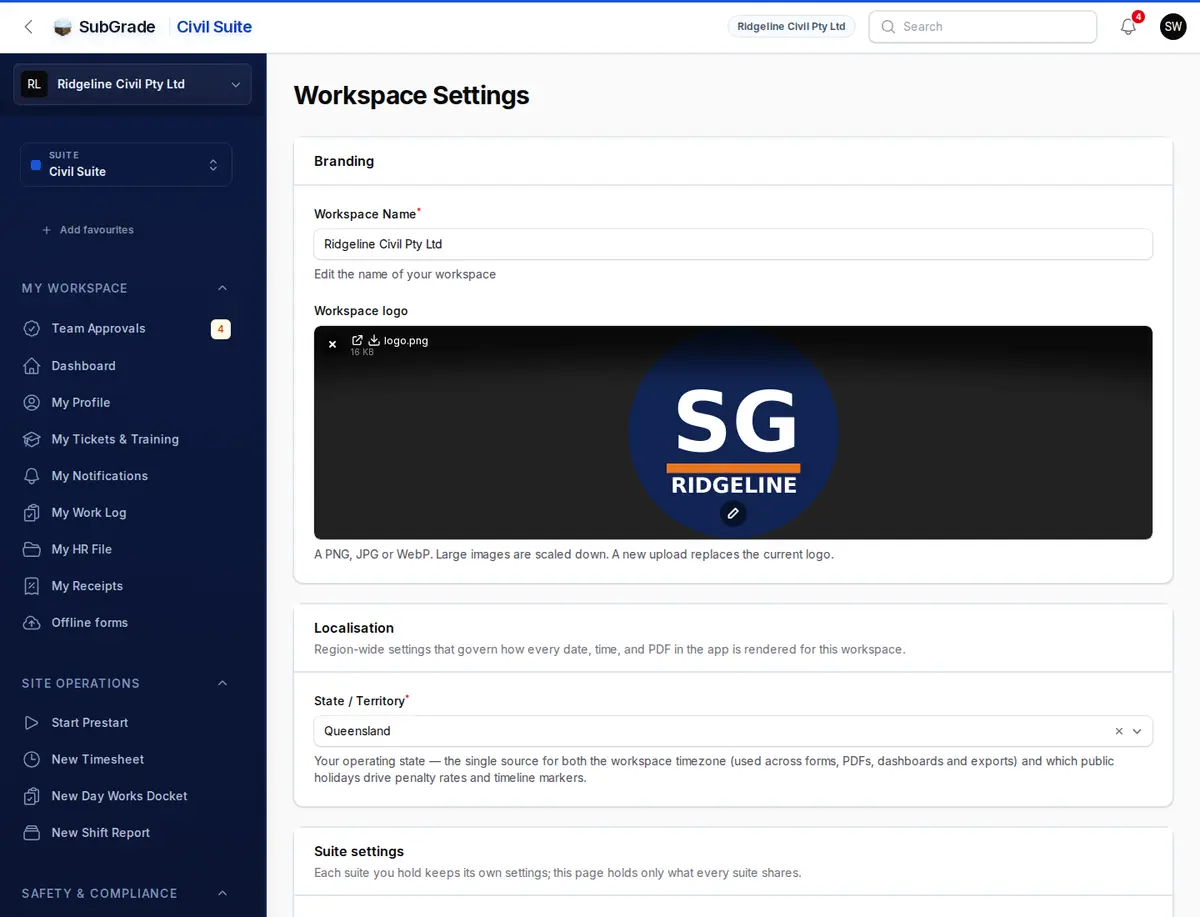
- Workspace Name — the name shown throughout the app.
- Workspace logo — a PNG, JPG or WebP up to 5 MB. Large images are scaled down, and a new upload replaces the current logo.
- State / Territory — your operating state. This sets both the workspace timezone, used across forms, PDFs, dashboards and exports, and which public holidays apply. There's no separate timezone field.
- Suite settings — a link to each suite's settings page you can open, such as Civil Suite Settings, Payroll Settings and Trade Pack Settings. It flags ABN not set if your ABN is missing.
- Accounting — shows whether Xero is connected, with a link to open it. You won't see this section if Xero isn't available to you.
Civil Suite Settings
The page has four tabs. Change any of them, then press Save Changes. Nothing is saved until you do, even when you switch tabs.
Onboarding
- Company induction — when on, new people do the induction as the last step of onboarding, before they can use SubGrade.
- What new people are asked — a plain summary of what your settings currently do.
- Induction module — the published training module people work through. It's required once Company induction is on. A workspace still using an older induction form can leave this empty and keep that form. Choosing a module replaces it.
- Also ask the people already here to do it — off means only people added from now on do the induction. On means everyone else is emailed and asked the next time they open SubGrade. The person saving isn't asked.
Build the module in Training Modules.
Toolbox & Safety
- Allowed toolbox template contexts — which kinds of checklist can be used on Toolbox Talks. If none are ticked, it's Toolbox Talk only.
Billing / RCTI
RCTI issuance — both are needed before you can issue a Recipient-Created Tax Invoice.
- Workspace ABN — your 11-digit ABN, checked for validity. It appears as the recipient ABN on every RCTI.
- Workspace is registered for GST — an RCTI can only be issued by a GST-registered recipient.
Subcontractor insurance — what you ask subcontractors to evidence, and how hard the answer bites.
- Certificates required from subcontractors — tick the cover types you want. Leave them all unticked to ask for nothing.
- Minimum sum insured — for each ticked type. Leave blank for no minimum.
- Block approval when cover is missing or expired — off by default. Turning it on before certificates are loaded stops every approval.
- Block RCTI finalisation when cover is missing or expired — off by default.
Submitting a work log is never blocked, whatever is set here. See Subcontractors.
HR
- Performance review frequency — Quarterly, Every 6 months, Annually or Every 2 years. This sets the next review date when a review is completed.
Connected pages
- Roles & Permissions — who can reach these pages.
- Subcontractors — where your ABN, GST registration and insurance rules apply.
- Training Modules — where the induction module is built.
- Payroll Settings — pay cycle, approvals, allowances, rain pay and exports, linked from Workspace Settings.
Tips & common mistakes
- Can't save with Company induction on? Choose an Induction module. It must be published to appear in the list.
- Worried about sending everyone back through the induction? Leave Also ask the people already here off, and only new people do it.
- RCTI won't finalise? Check the Workspace ABN is valid and Workspace is registered for GST is on. If you turned on the insurance block, check the subcontractor's cover too.
- Wrong public holidays or times? Fix State / Territory. Timezone and holidays both follow it.
- Looking for invitations or roles? They're not here. See People and Roles & Permissions.