The company-wide view of what the business is making, job by job, and what it is costing. It reads from the posted Budget Ledger, and it tells you when the figures are incomplete rather than showing a quiet zero.
Who can use it — Anyone with "view budget tracking" permission. Retry failed batches also needs "manage budget period locks". See Roles & Permissions.
Where to find it — Costs & Budget → Budget Overview in the sidebar.
Before you start — the figures are only as complete as the setup behind them:
- Pay levels, asset costs, fuel rates and overhead entries need to exist before those costs can flow through. Gaps show under What needs action.
- Timesheets must be approved and Day Works dockets signed or distributed before their cost posts.
- Revenue needs a job contract, sales invoices from Xero, or other income. With none of those, the page shows cost only and says revenue isn't tracked yet. If Xero is not set up for your workspace, you will not see the Connect Xero option.
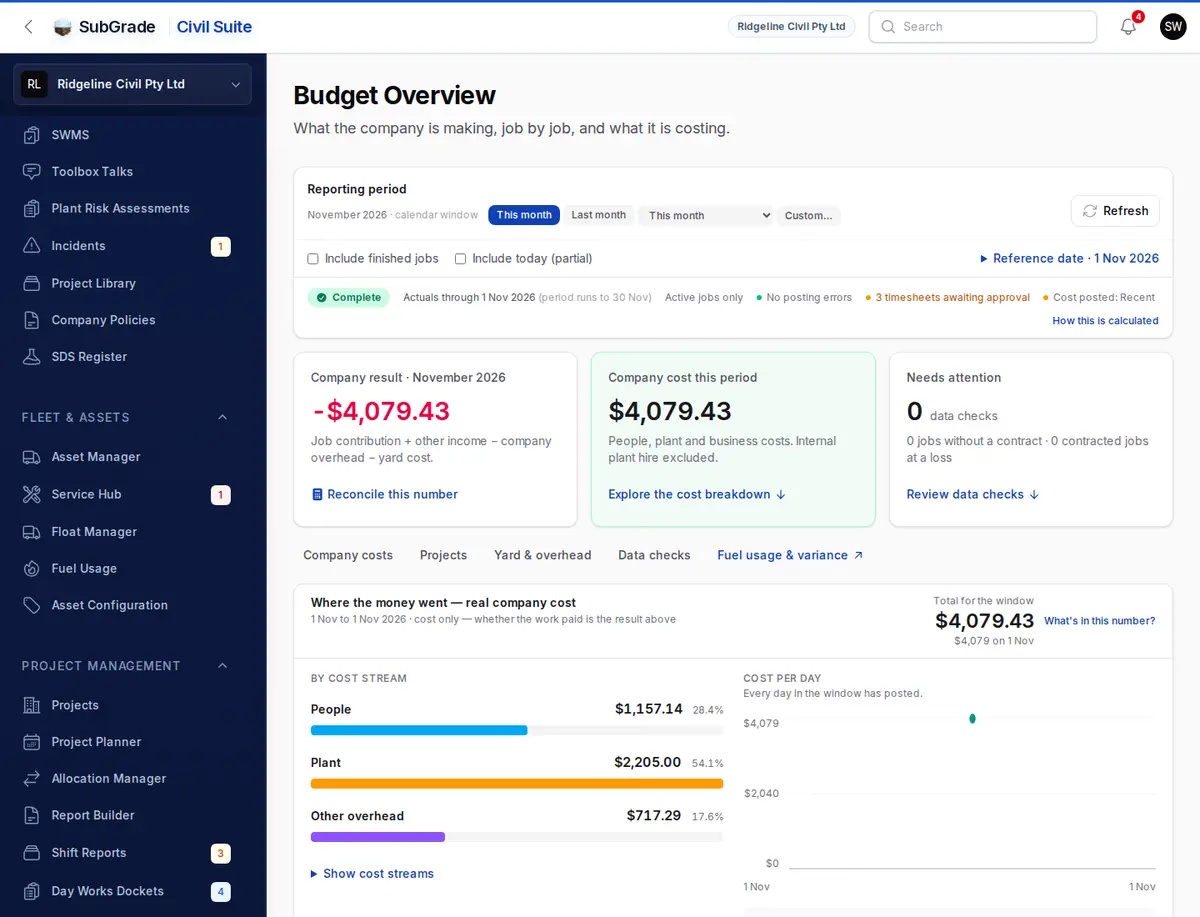
Choosing the period
The Reporting period bar sets the window for the whole page.
- This month and Last month are one tap. The list beside them adds a chosen month, the current or last pay cycle, last 7 days and last 90 days, and Custom… picks your own dates.
- Include finished jobs adds completed jobs to the job figures. By default only active jobs count.
- Include today (partial) adds today, which is still accruing.
- Reference date moves the date that relative periods are counted from.
- Refresh reloads the figures.
The line under the bar shows whether you can trust the window: how complete it is, the date actuals run through, whether there are posting errors, any timesheets awaiting approval, and how fresh the posted cost is. How this is calculated opens the exact period, jobs and basis behind the figures, with a short guide to how budget tracking works.
A future period shows "This period has not happened yet", not zeros. A valid period with no activity shows "Nothing posted yet".
The three cards
- Company result — job contribution, plus other income, less company overhead, less yard cost. Reconcile this number breaks it down line by line. If revenue is incomplete the card says it is not a profit or loss yet.
- Company cost this period — people, plant and business costs, with internal plant hire excluded. Explore the cost breakdown jumps down the page.
- Needs attention — a count of data checks, such as jobs without a contract and contracted jobs at a loss. Review data checks jumps to the list.
Where the money went
This section shows real company cost for the window. It does not say whether the work paid; the company result does that.
- By cost stream — People, Plant and Other overhead, with Show cost streams for the detail. What's in this number? lists what is included and left out. Hire equipment, draft invoices, unapproved claims, unapproved timesheets and the revenue side are left out.
- Cost per day — a chart that stops at the last posted day instead of drawing zeros. Show the daily figures opens the numbers.
- Wages by job and Plant fuel by job — the top five jobs for each.
- Fuel included in plant costs — fuel split into recorded deliveries, estimates and prestart readings. These are already in the totals above, not extra.
Fuel usage & variance opens the Fuel Usage page on its variance view for the same dates.
Where each job stands
A table of active jobs, worst contribution first. Unlike the rest of the page, this table is position to date: cumulative since each job started, not the selected period.
Each row shows Earned, Direct cost, Internal plant hire, Total job cost, Contribution and Complete. A job with no contract says so, and a job earning from Xero sales invoices shows as invoiced. Find a project narrows the rows, but the reconciliation totals still include every job. Open this job's P&L goes to that job's own figures.
Below the table, Yard, overhead & company position to date expands to show contract value, what is left to earn, exposure, the yard or base cost centre against its budget, how much overhead was charged to jobs, and Charged to jobs vs spent by the company, which compares internal charges with real cost. That gap is a buffer, not extra money.
What needs action
This section answers "what is stopping these numbers from being complete", with a way to fix each item wherever there is one. Depending on your data you may see:
- Workers with approved hours but no active pay level — their wages cannot be costed. Assign pay levels opens Pay Rates. Once assigned, those dates clear automatically. Staff excluded from payroll are not flagged here.
- Machines with hours but no cost rate — ownership, servicing and fuel count as $0 while the operator's wages still count. Set up asset costs opens Asset Costs.
- Machines with a fuel burn but no fuel rate — fuel counts as $0 until you add one. If rates were added after the days posted, Re-cost those days fixes them.
- Records-based costs with no records — machines set to read compliance or service records that have none logged.
- Contract, variation and supplier invoice gaps — lines that cannot be earned against, variations that disagree with their lines, and invoice lines not tied to a job.
- Staff excluded from payroll with no funded overhead entry, $0 overhead entries, and insurance policies with no premium.
- Work with no project — Group it gives it a home.
- Open GPS questions — Open the GPS queue settles them.
- Failed budget batches — dates that failed to post. Retry failed batches re-runs them and clears the ones whose cause is fixed.
Notes about the pipeline, such as timesheets awaiting approval, sit behind a small link at the bottom. When nothing needs attention you see All cost streams flowing.
Connected pages
- Budget Ledger — every row behind these figures, with Explain Calculation.
- Asset Costs — what machines cost to own and run.
- Overhead — company costs, costs charged to jobs, and other income.
- Pay Rates — pay levels and who is on them.
- Projects — the jobs in the table.
Tips & common mistakes
- A figure looks low or missing? Check What needs action first. A $0 usually traces to a missing pay level, cost rate or fuel rate.
- Recent work seems to be missing? Only approved work counts. Timesheets awaiting approval show on the line under the period bar.
- The job table doesn't match the period? It is cumulative on purpose. The heading says so.
- Looking for one job? Use Find a project, then Open this job's P&L.
- No Retry button? It needs "manage budget period locks". Failed dates caused by missing setup also clear on later posting runs once the setup is fixed.