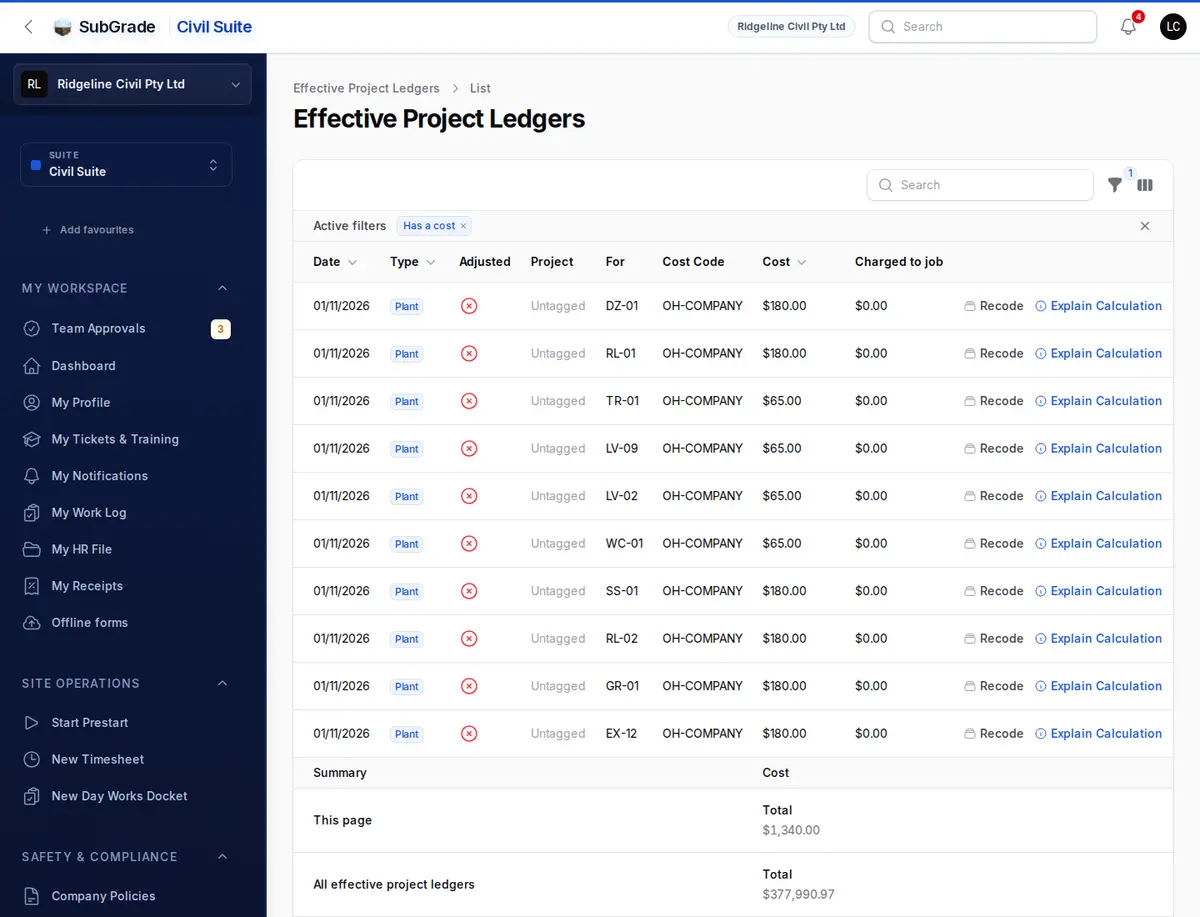
Every dollar posted shows up here as a dated row: what it was for, which job and cost code it sits against, and the before and after if it was later corrected. You do not type entries here. SubGrade posts them as work is approved, and this is where you check and explain them.
Who can use it — You need "view budget ledger" permission to open the page. Nobody can create, edit or delete a row. Recode needs "manage cost codes". See Roles & Permissions.
Where to find it — Costs & Budget → Budget Ledger in the sidebar. The page itself is headed Effective Project Ledgers.
How to use it
One row per posted cost, newest first. Costs that have since been adjusted show their current figure.
- Date — the day the cost belongs to, not the day it posted.
- Type — Wages, Leave, Plant or Overhead, plus Subcontract, Material and Float where you use them.
- Adjusted — whether the row has been corrected since it posted.
- Project — "Untagged" means the row has no job, such as company overhead or a machine's fixed daily cost.
- For — the worker or machine.
- Cost Code, Cost and Charged to job. Charged to job only shows if your role can see margin.
The column picker adds Cost before changes, Change, Posting batch and Posted. Totals for the page and for all rows sit at the bottom.
Filters: Has a cost (on by default, so zero rows stay out of the way), Type, Project, Adjusted rows and Date Range. The Type filter offers Wages, Leave, Plant and Overhead.
Row actions:
- Explain Calculation — the inputs and outputs behind the row, such as hours, rates and fuel pricing, plus the full record that was saved. Without "view pay level rates", hourly rates are hidden here.
- Adjustment History — appears once a row has been adjusted. It lists each reversal and replacement with its date, cost change, reason and batch.
- Recode — moves the row to another cost code, with an optional reason. Locked budget periods cannot be changed.
How entries get posted
Each row comes from an approval or completion elsewhere:
- Wages — approved timesheet entries, priced at the worker's pay rate for that date, including penalty hours and allowances. People marked Exclude from payroll get no row, because a combined overhead entry carries them.
- Leave — paid leave in approved timesheets.
- Plant — several kinds of row:
- Running cost on the job — fuel from approved timesheet hours, using recorded litres when there are any and the machine's burn rate otherwise.
- Fixed daily cost — ownership, plus depreciation if switched on, every calendar day, with no job. This is a fleet cost whether or not the machine turns a wheel.
- Servicing — built up from hours worked.
- Internal hire — the day rate a job is charged while it holds a machine, shown under Charged to job.
- Docket equipment — hours-based lines on a Signed or Distributed docket. See Day Works Dockets.
- Overhead — one company row a day from your overhead entries, plus a row on the job for anything charged to a project.
- Subcontract — approved subcontract claims and work-log RCTIs.
- Material — approved supplier invoice lines.
- Float — completed float bookings with a cost.
Posting starts when a timesheet is approved and runs again every hour to catch everything else. If an input changes after a row has posted, such as a corrected pay rate or machine cost, SubGrade re-prices the affected rows and posts a reversal and replacement. The original is never edited, and locked periods are skipped.
If posting fails for a date it appears on Budget Overview under What needs action, with Retry failed batches for anyone holding "manage budget period locks".
What feeds the ledger
These are all under Cost setup in the sidebar, except fuel rates, which live on Fuel Usage.
- Pay levels — Pay Rates.
- Asset costs — what machines cost to own and service. See Asset Costs.
- Overhead entries and categories — see Overhead.
- Cost codes — short identifiers such as
OH-PLANT-DOZER, two levels deep at most. They are on the Overhead page. - Fuel rates — price per litre, on the Fuel Rates tab of Fuel Usage. Editing needs "manage asset cost profiles".
Connected pages
- Budget Overview — the summary of everything in this ledger, and what needs action.
- Overhead — cost codes, overhead categories and entries.
- Asset Costs — machine costs.
- Projects — the jobs rows are tagged to.
- Day Works Dockets — dockets whose equipment lines post here.
Tips & common mistakes
- Can't find an edit button? There isn't one. Fix the source, such as the timesheet, cost rate or overhead entry, and the ledger follows. Only the cost code can be changed here.
- A number looks wrong? Open Explain Calculation first. It shows the hours, rates and formula, so you can tell whether the source or the setup is off.
- A row is marked Adjusted? That is normal. An input changed and SubGrade re-priced it.
- Rates hidden? You need "view pay level rates".
- Lots of plant rows with no project? Those are the fixed daily costs of the fleet. They belong to no job.
- Labour missing for a worker? Check whether they are excluded from payroll, and whether they have a pay level on that date.
- A docket's plant hours aren't showing? They post only at Signed or Distributed, and only for equipment lines billed in hours.